






Microsoft Office has long been the gold standard for productivity software, but recent security vulnerabilities in the “local” versions of Office applications have raised serious concerns about user safety. While Microsoft actively promotes cloud-based Office 365 (now Microsoft 365), many organizations and individuals still rely on locally installed Office applications. Understanding these vulnerabilities and their implications is crucial for protecting your data and systems.
Understanding the Local Office Architecture
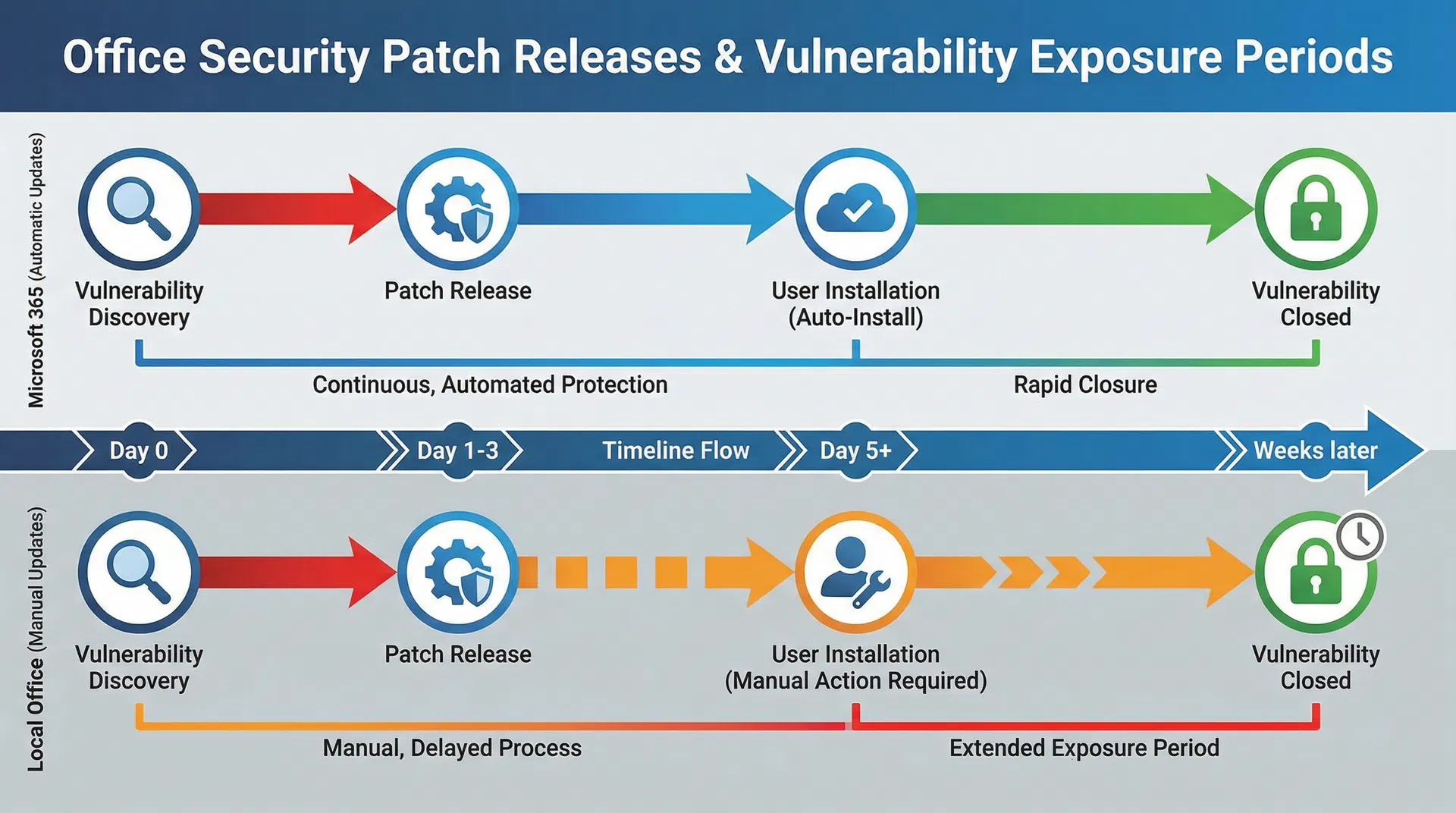
Local Office installations refer to Microsoft Office applications installed directly on your computer, such as Office 2021 or Office 2019, as opposed to Microsoft 365 cloud-based subscriptions. These local versions operate independently without constant cloud connectivity, offering offline functionality and a degree of autonomy. However, this independence comes with security trade-offs. Local Office applications receive security updates less frequently than cloud-based alternatives, and users must manually install patches. The architecture of local Office, with its extensive file format support and legacy compatibility, creates potential security vulnerabilities that attackers can exploit.
Critical Vulnerabilities in Local Office
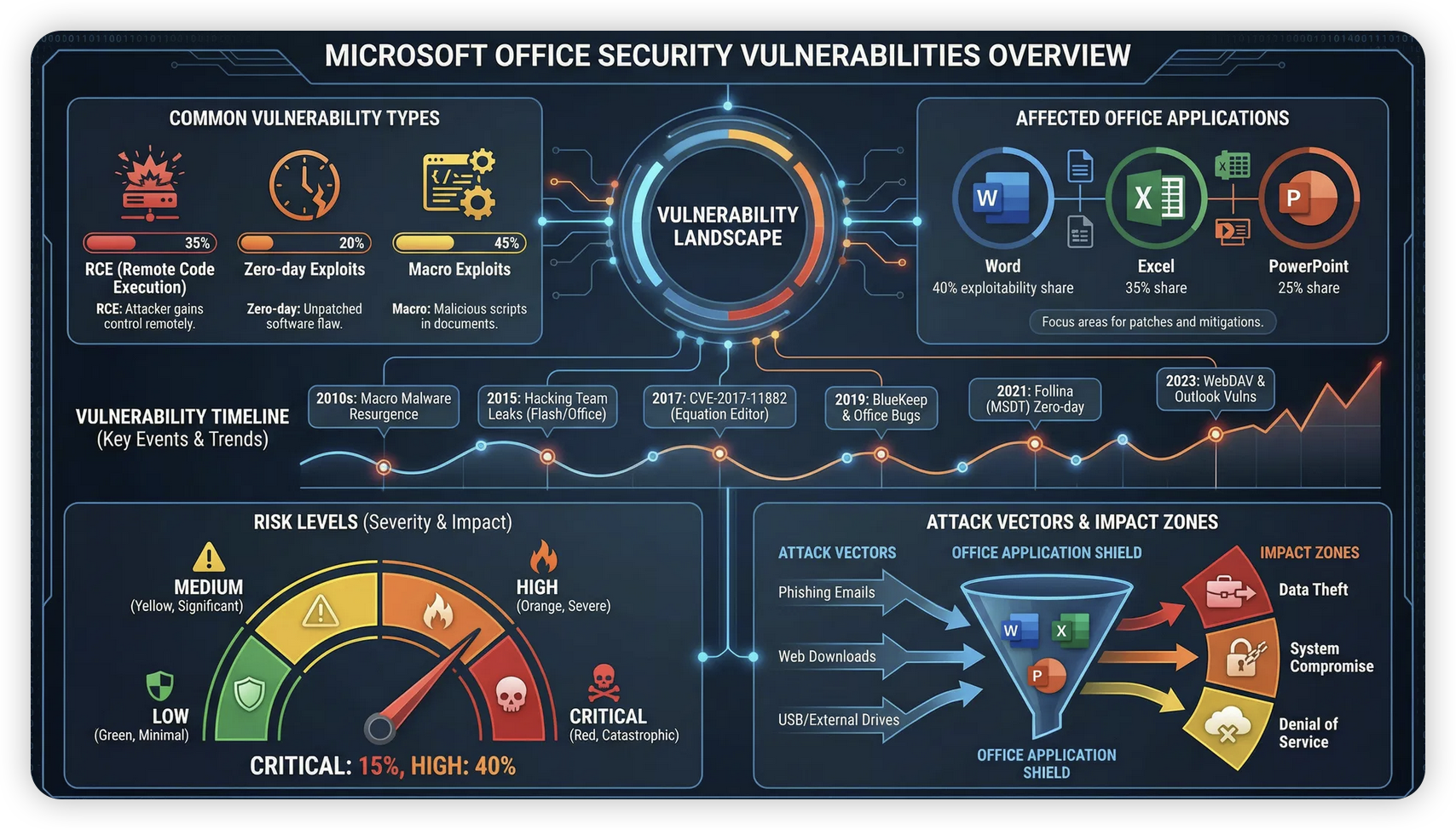
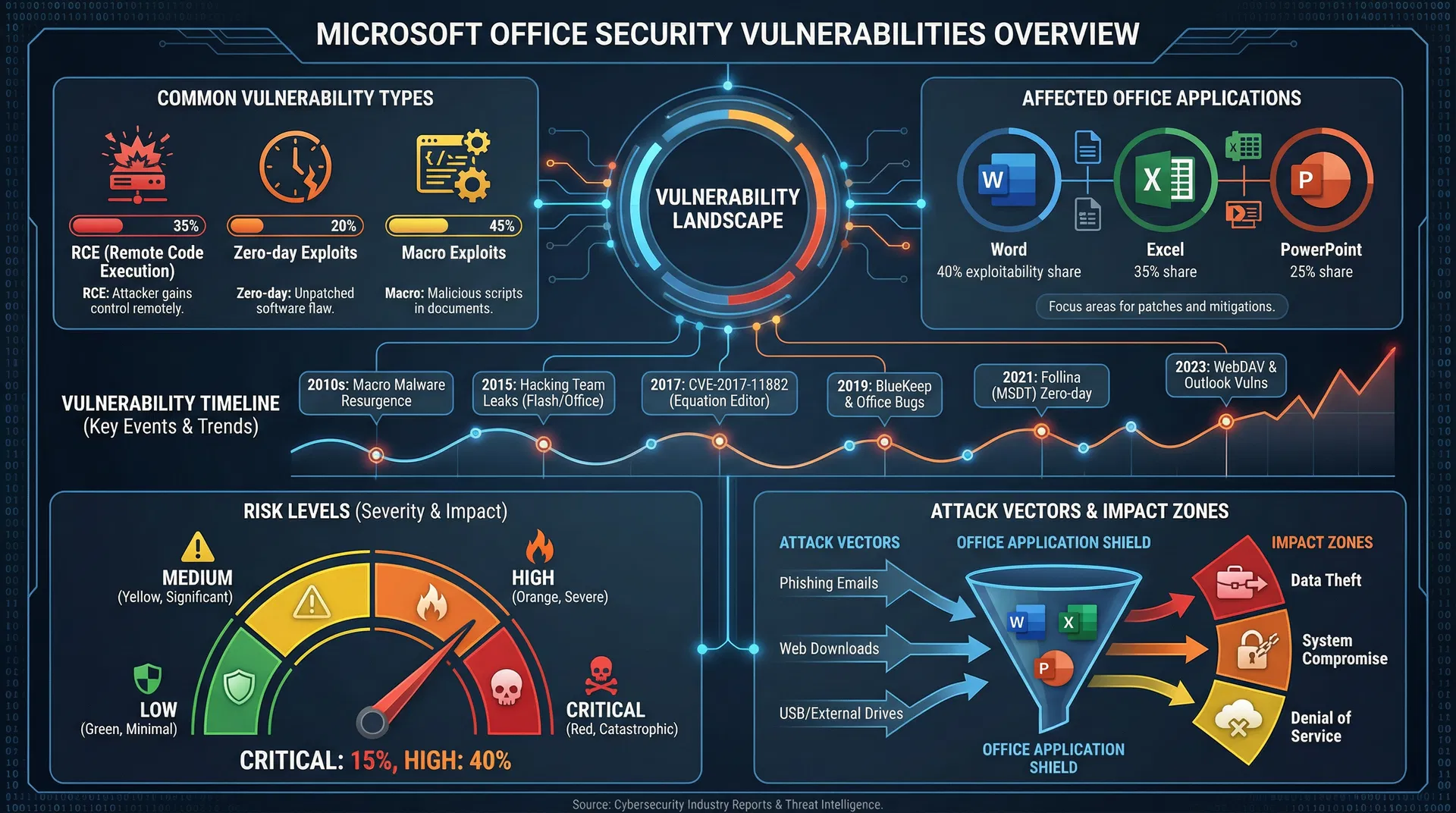
Recent security research has identified several critical vulnerabilities in local Office installations. These vulnerabilities primarily affect Microsoft Word, Excel, and PowerPoint, the most widely used applications in the suite. One major category involves remote code execution (RCE) vulnerabilities, where specially crafted documents can execute malicious code when opened. Another category involves zero-day exploits that Microsoft patches slowly, leaving users vulnerable for extended periods. The CVE (Common Vulnerabilities and Exposures) database lists hundreds of Office-related vulnerabilities, many remaining unpatched in older Office versions.
How Attackers Exploit Office Vulnerabilities
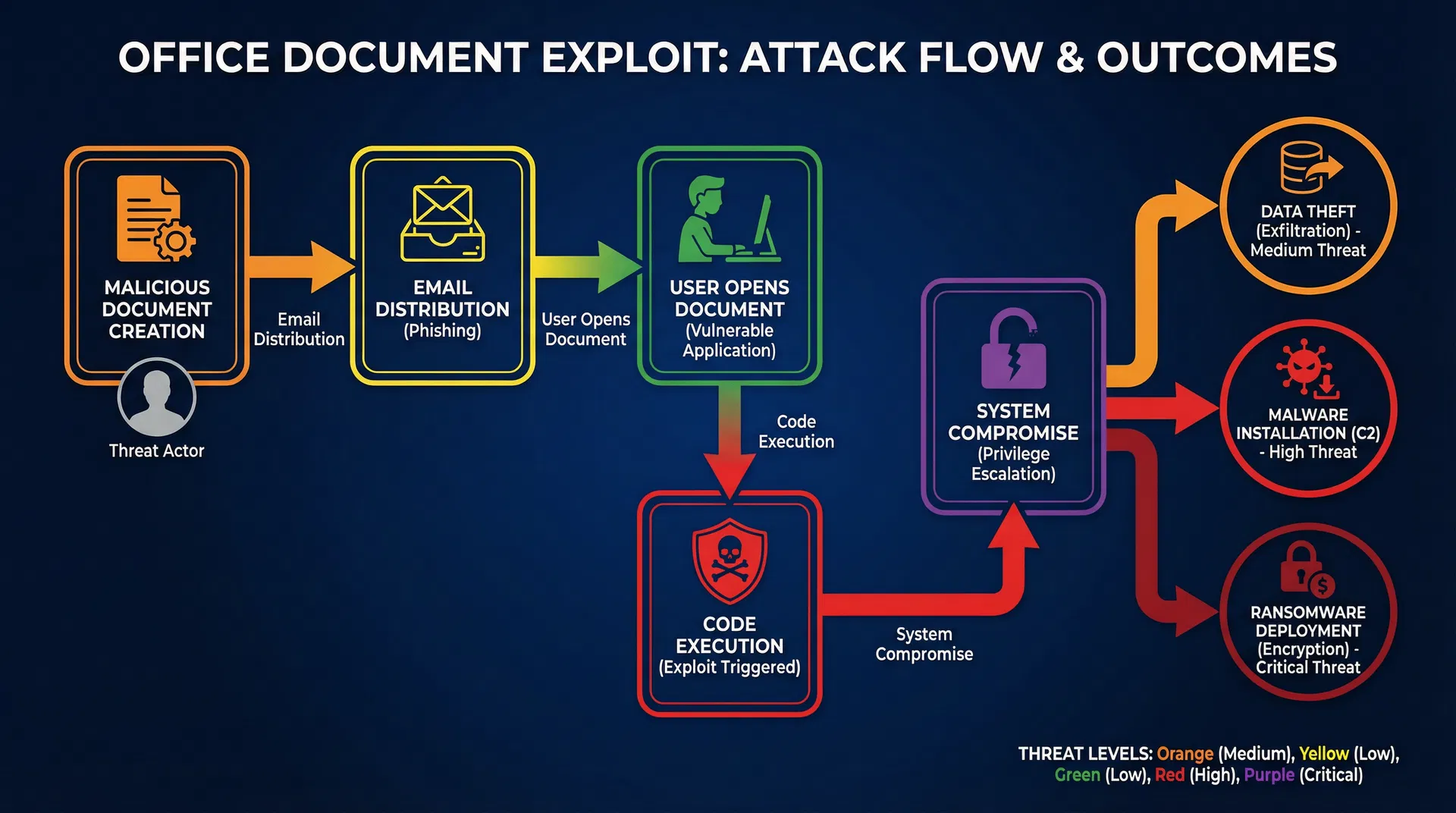
Attackers typically exploit Office vulnerabilities through malicious documents distributed via email or compromised websites. A user receives what appears to be a legitimate Word document or Excel spreadsheet, but opening it triggers the vulnerability, allowing the attacker to execute code with the user’s privileges. This code can steal credentials, install malware, encrypt files for ransomware attacks, or establish persistent access to the system. The sophistication of these attacks has increased significantly, with nation-state actors and organized cybercriminals actively exploiting Office vulnerabilities.
The Microsoft 365 Alternative
Microsoft 365 (formerly Office 365) addresses many security concerns inherent in local Office installations. Cloud-based Office applications receive automatic security updates, ensuring users always have the latest patches. Microsoft’s cloud infrastructure includes advanced threat detection and response capabilities. The sandboxed environment of web-based Office applications provides additional security layers. However, Microsoft 365 requires active internet connectivity and involves data storage in Microsoft’s cloud infrastructure, which raises privacy concerns for some users.
Patching Challenges in Local Office
Local Office installations face significant patching challenges. Microsoft releases security patches monthly through Windows Update, but users must ensure automatic updates are enabled and install patches promptly. Many organizations delay patches due to compatibility concerns with existing workflows or macros. Some users running older Office versions, such as Office 2016 or Office 2013, no longer receive security updates, leaving them permanently vulnerable. This creates a fragmented security landscape where many users operate with known vulnerabilities.
Specific Vulnerabilities and Their Impact
Several specific vulnerabilities have demonstrated the severity of local Office security issues. The Follina vulnerability (CVE-2022-30190) in Microsoft Office allowed remote code execution through Word documents. The Emotet malware campaign extensively exploited Office vulnerabilities to distribute ransomware. The ProxyLogon vulnerability chain affected Exchange Server but highlighted how Office ecosystem vulnerabilities can have cascading effects. Understanding these specific vulnerabilities helps illustrate the real-world risks users face.
Protecting Your Local Office Installation
If you continue using local Office installations, several protective measures are essential. First, enable automatic Windows Update to ensure security patches install promptly. Second, disable unnecessary Office features like macros if you don’t use them, as many exploits leverage macro functionality. Third, configure Office security settings to warn about potentially dangerous content. Fourth, avoid opening suspicious documents from untrusted sources. Fifth, consider using Office in a sandboxed environment or virtual machine for high-risk documents. Finally, maintain regular backups to protect against ransomware attacks.
Migration Strategies to Microsoft 365
For organizations seeking to eliminate local Office vulnerabilities, migration to Microsoft 365 provides a comprehensive solution. However, migration requires careful planning to ensure compatibility with existing workflows, macros, and integrations. Organizations should conduct a thorough assessment of current Office usage, identify compatibility issues, and develop a phased migration plan. Training users on cloud-based Office features is essential for successful adoption. The migration investment pays dividends through improved security, automatic updates, and enhanced collaboration features.
Evaluating Your Risk Profile
Your vulnerability to Office exploits depends on several factors. If you frequently open documents from untrusted sources, your risk is significantly higher. If your organization uses older Office versions, vulnerability exposure is greater. If you work with sensitive data, the impact of a successful attack is more severe. Evaluating your specific risk profile helps determine whether upgrading to Microsoft 365, implementing stronger security measures, or maintaining local Office with enhanced protection is appropriate.
Conclusion
Microsoft’s local Office installations contain significant security vulnerabilities that pose real risks to users and organizations. While cloud-based Microsoft 365 addresses many of these concerns, it’s not suitable for all users. Whether you choose to migrate to Microsoft 365 or continue using local Office, understanding these vulnerabilities and implementing appropriate protective measures is essential. Stay informed about security updates, practice safe document handling, and evaluate whether your current Office deployment aligns with your security requirements. The cost of a successful Office exploit far exceeds the investment in proper security measures.