





Apple’s MacBook Pro Display Backlight Service Program addresses display issues affecting certain MacBook Pro models. If your MacBook Pro has a dim or flickering display, you may be eligible for free repair under this program. This comprehensive guide explains what you need to know about the service program, eligibility requirements, and how to request service.
Overview of the Service Program
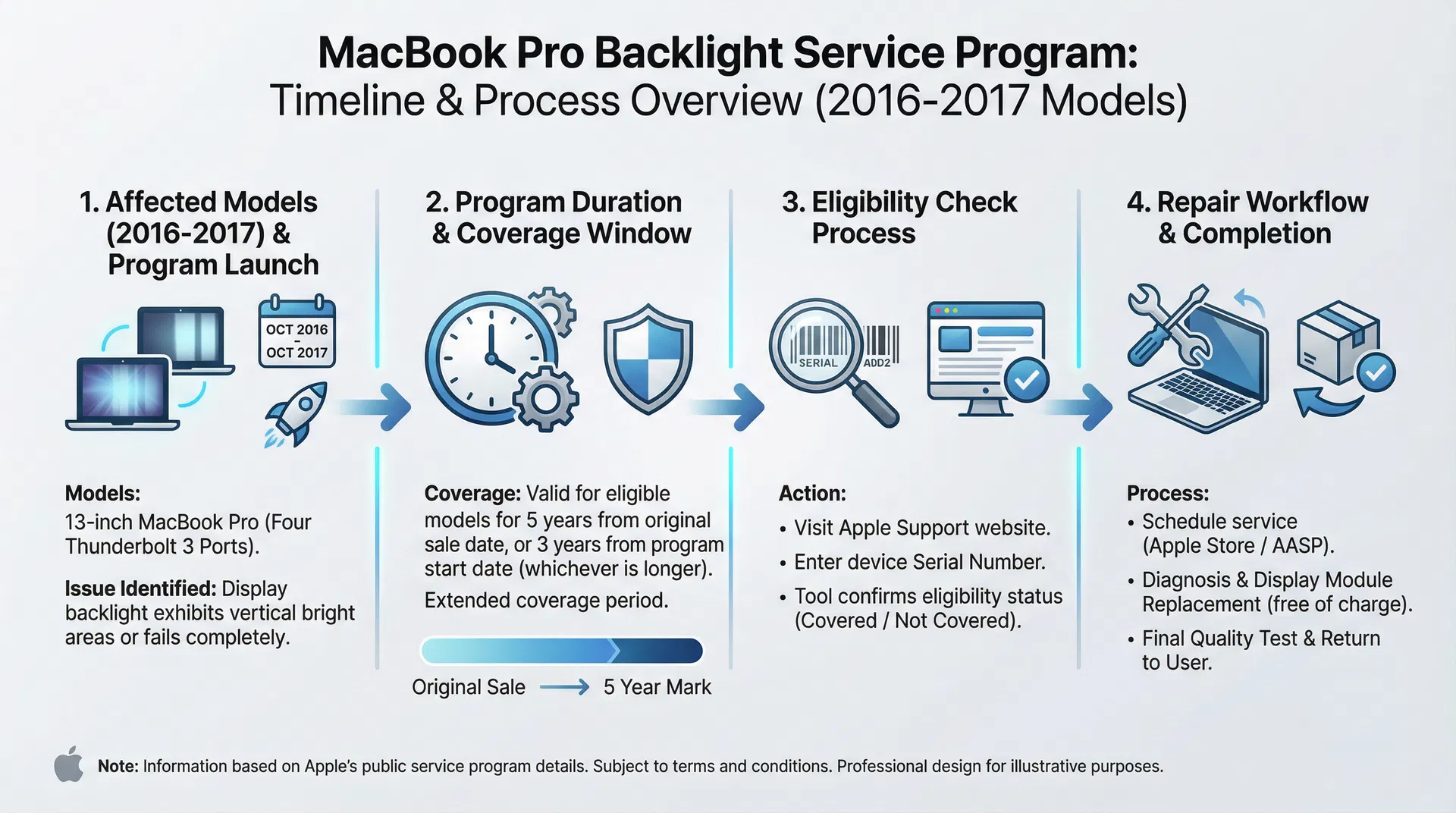
Apple launched the MacBook Pro Display Backlight Service Program to address backlight failures in specific MacBook Pro models. The program covers eligible devices for an extended period, ensuring users with affected devices can get free repairs.
Affected MacBook Pro Models
The service program covers the following MacBook Pro models:
- MacBook Pro 13-inch (2016, Two Thunderbolt 3 ports)
- MacBook Pro 13-inch (2016, Four Thunderbolt 3 ports)
- MacBook Pro 15-inch (2016)
- MacBook Pro 13-inch (2017, Two Thunderbolt 3 ports)
- MacBook Pro 13-inch (2017, Four Thunderbolt 3 ports)
- MacBook Pro 15-inch (2017)
Backlight Failure Symptoms
If your MacBook Pro display exhibits any of these symptoms, it may qualify for service:
- Dim Display: The screen appears noticeably darker than normal, even at maximum brightness
- Uneven Brightness: Some areas of the display are darker than others
- Stage Light Effect: The bottom of the display is significantly brighter than the top
- Flickering: The display flickers or flashes intermittently
- No Backlight: The display appears completely dark despite the MacBook being powered on
Service Program Coverage Timeline
The MacBook Pro Display Backlight Service Program provides coverage for:
- Duration: Up to 5 years after the first retail sale of the device, or 3 years from the program start date (whichever is longer)
- Current Status: The program remains active and covers eligible devices
- Cost: Free repair for eligible devices
Checking Eligibility
Step 1: Find Your Serial Number
- Click the Apple menu in the top-left corner
- Select “About This Mac”
- Note the Serial Number displayed
Step 2: Check Eligibility Online
- Visit Apple’s Service Program page
- Enter your MacBook Pro serial number
- The system will confirm if your device is eligible
Step 3: Verify Symptoms
Ensure your MacBook Pro displays backlight failure symptoms consistent with the program description.
How to Request Service
Option 1: Apple Store
- Visit your nearest Apple Store
- Make a Genius Bar appointment (recommended)
- Bring your MacBook Pro and proof of purchase
- Explain the backlight issue
- The Genius Bar will verify eligibility and arrange repair
Option 2: Apple Authorized Service Provider
- Locate an Apple Authorized Service Provider near you
- Contact them to schedule an appointment
- Bring your MacBook Pro and serial number
- They will verify eligibility and process your repair request
Option 3: Mail-In Service
- Visit Apple Support online
- Select “Repair and Physical Damage”
- Choose “Mail in for Repair”
- Follow the instructions to ship your MacBook Pro
- Apple will repair and return it to you
Repair Process and Timeline
What to Expect:
- Diagnosis: Apple technicians will confirm the backlight failure
- Repair: The display assembly will be replaced
- Testing: The repaired MacBook Pro will be tested to ensure proper function
- Return: Your MacBook Pro will be returned to you
Timeline:
- Apple Store repair: Usually 3-5 business days
- Mail-in repair: Typically 5-7 business days (plus shipping time)
- Authorized service provider: Varies by location
Important Considerations
Data Backup:
Before sending your MacBook Pro for repair, back up all important data. While Apple technicians typically don’t erase the drive, it’s always safer to have a backup.
Warranty Coverage:
The service program repair includes a 90-day limited warranty on the replaced display assembly.
Out-of-Warranty Options:
If your MacBook Pro is not eligible for the service program, out-of-warranty display replacement typically costs $300-500.
Frequently Asked Questions
Q: Is the service program still active in 2026?
A: Yes, the MacBook Pro Display Backlight Service Program remains active and covers eligible devices.
Q: How do I know if my MacBook Pro qualifies?
A: Check your serial number on Apple’s service program page. Only 2016-2017 models are eligible.
Q: Will my data be erased during repair?
A: Typically no, but it’s recommended to back up your data before sending your MacBook Pro for service.
Q: How long does the repair take?
A: Apple Store repairs usually take 3-5 business days. Mail-in service takes 5-7 business days plus shipping.
Q: What if my MacBook Pro is still under warranty?
A: The service program covers the backlight issue regardless of warranty status.
Q: Can I get a replacement MacBook Pro instead of repair?
A: The program covers repair only. Replacement is not typically offered unless the device cannot be repaired.
Prevention and Maintenance Tips
While you cannot prevent backlight failure entirely, these tips may help extend your display’s lifespan:
- Avoid Excessive Heat: Keep your MacBook Pro in cool environments
- Proper Ventilation: Ensure adequate airflow around the device
- Screen Care: Avoid excessive pressure on the display
- Regular Updates: Keep macOS updated for optimal hardware performance
- Professional Cleaning: Use approved cleaning methods for the display
Conclusion
If your MacBook Pro displays backlight failure symptoms, the Apple MacBook Pro Display Backlight Service Program provides free repair for eligible devices. By checking your eligibility and contacting Apple or an authorized service provider, you can get your MacBook Pro repaired quickly and at no cost. Don’t delay if you notice backlight issues—the sooner you address them, the sooner you can return to using your MacBook Pro at full capacity.