


Gaming performance differs significantly between Windows PCs and gaming consoles, with RAM usage being a notable distinction. Windows games often consume more RAM than their console counterparts, a phenomenon that puzzles many gamers. Understanding the reasons behind this difference reveals fundamental architectural and software design differences between these platforms.
1. Operating System Overhead
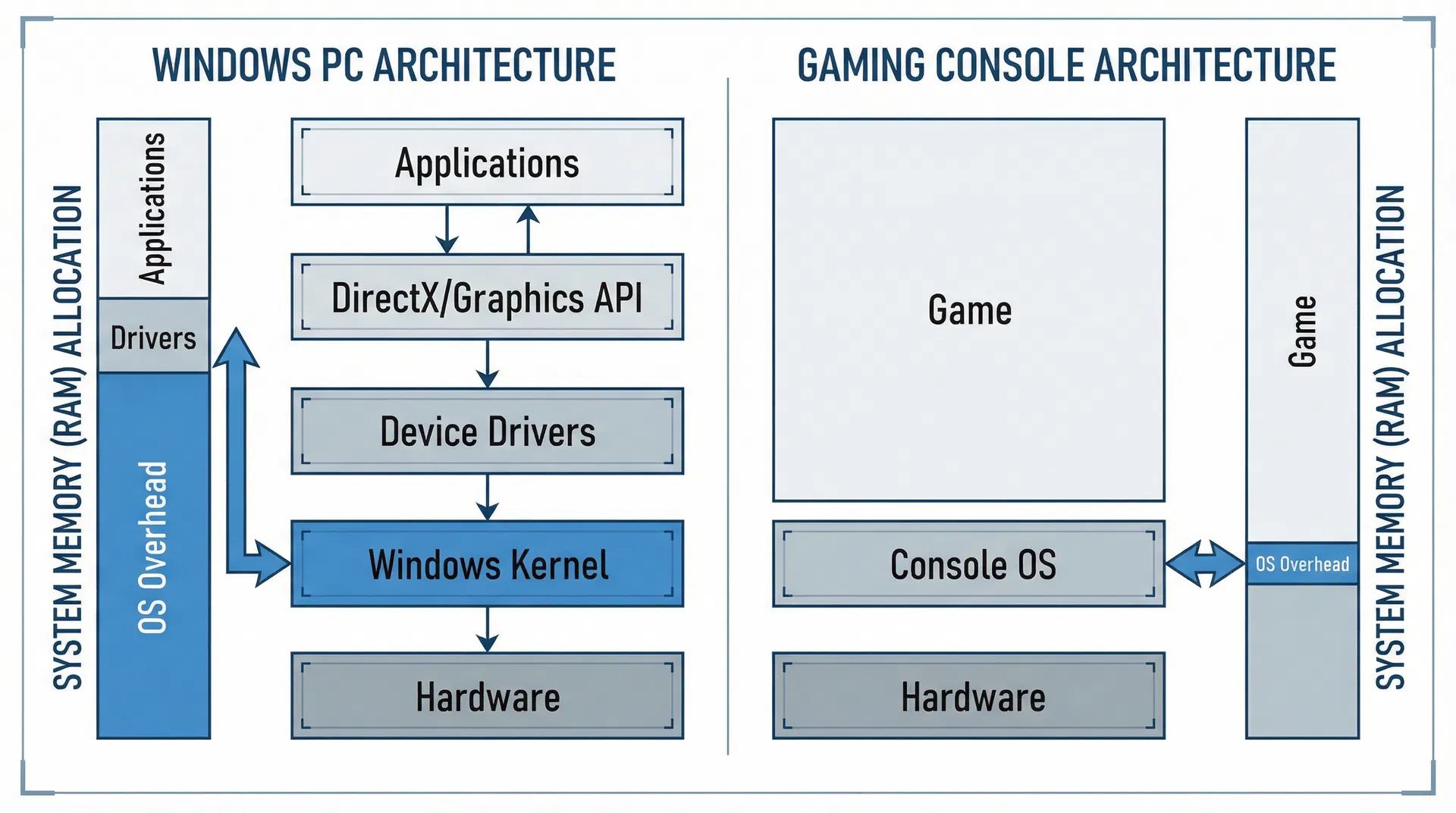
Windows is a general-purpose operating system designed for diverse computing tasks, requiring substantial system resources to function. The Windows kernel, device drivers, system services, and background processes consume significant RAM even before launching a game. A typical Windows system uses 2-4 GB of RAM just for the operating system and background services. In contrast, gaming consoles run specialized operating systems optimized specifically for gaming, using minimal resources for system functions. This allows console games to allocate more RAM exclusively to game content. When you launch a Windows game, you’re competing with the operating system for available RAM, whereas console games have the entire system’s RAM available for game use.
2. Inefficient Memory Management and Abstraction Layers
Windows games must work across diverse hardware configurations, requiring abstraction layers that add complexity and memory overhead. DirectX and other graphics APIs provide compatibility across different graphics cards and hardware configurations, but this abstraction comes at a cost. These layers require additional memory for translation, buffering, and compatibility checks. Console games, developed for specific hardware, can directly access hardware resources without abstraction layers. Developers can optimize memory usage precisely for the console’s architecture, eliminating unnecessary overhead. This direct hardware access allows console games to use RAM more efficiently, with less wasted space due to abstraction layers and compatibility buffers.
3. Texture and Asset Quality Differences
Windows games often feature higher resolution textures and more detailed assets than console versions. Higher resolution textures require more RAM to store in memory. A 4K texture requires four times the memory of a 1080p texture. Windows games targeting high-end graphics cards often include ultra-high resolution textures that consume substantial RAM. Console games, targeting specific screen resolutions (typically 1080p or 4K), use optimized texture sizes appropriate for their target resolution. Additionally, Windows games often include multiple texture quality settings, requiring different texture assets to be loaded into memory. Console games, optimized for specific hardware, use a single optimized texture set, reducing memory requirements.
4. Memory Fragmentation and Allocation Inefficiency
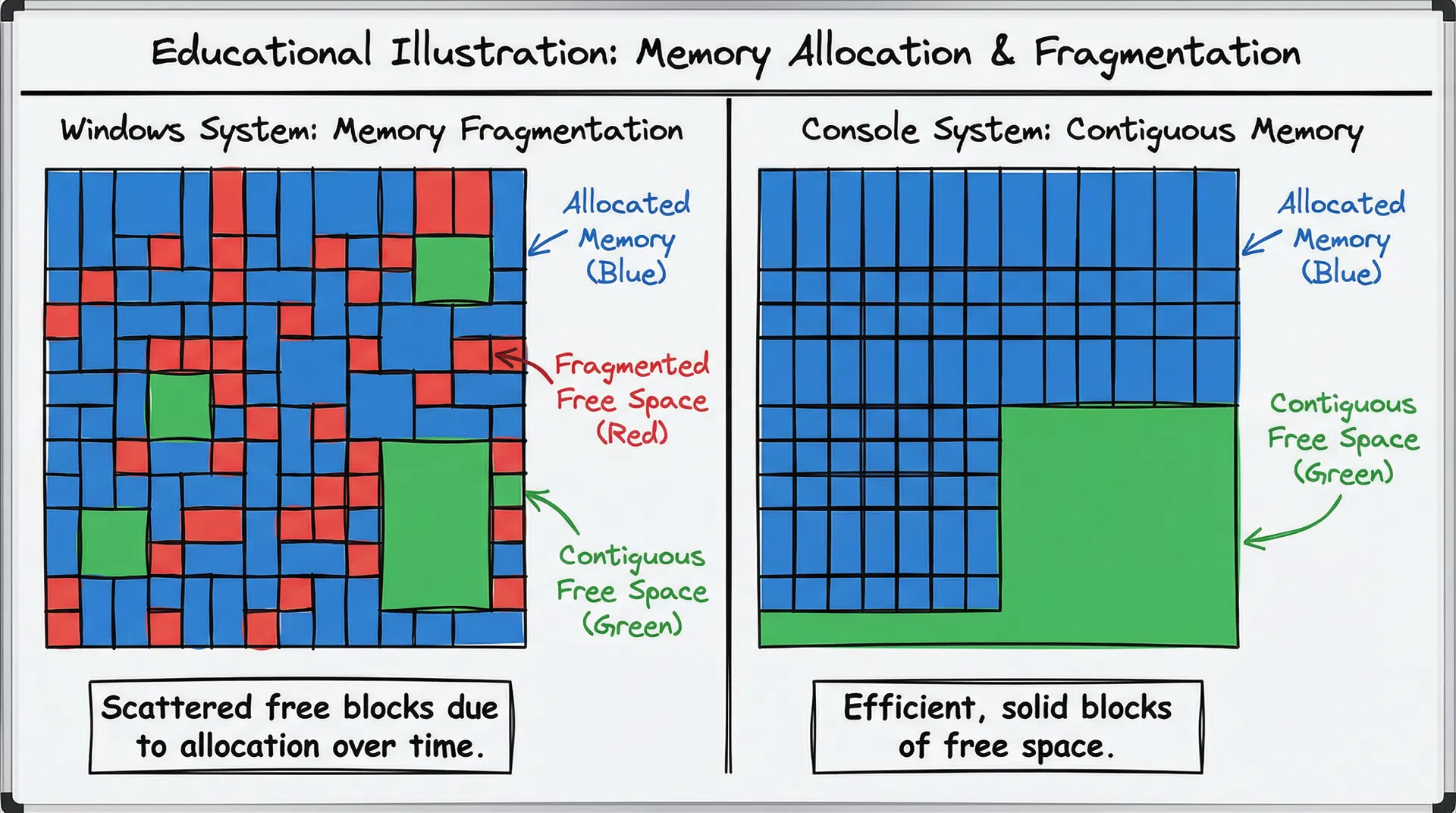
Windows memory management is more complex due to the operating system’s need to manage memory for multiple simultaneous applications. Memory fragmentation occurs when free memory becomes scattered across the RAM, reducing the efficiency of memory allocation. Games running on Windows must work within this fragmented memory landscape, often requiring more total RAM to accommodate fragmentation. Console systems, running only the game and minimal system processes, experience minimal memory fragmentation. The game’s memory allocation is contiguous and efficient, maximizing usable memory. Additionally, Windows games must allocate memory for various system services and background processes that may wake up during gameplay, requiring additional RAM buffers to prevent performance degradation.
5.Practical Implications for Gamers
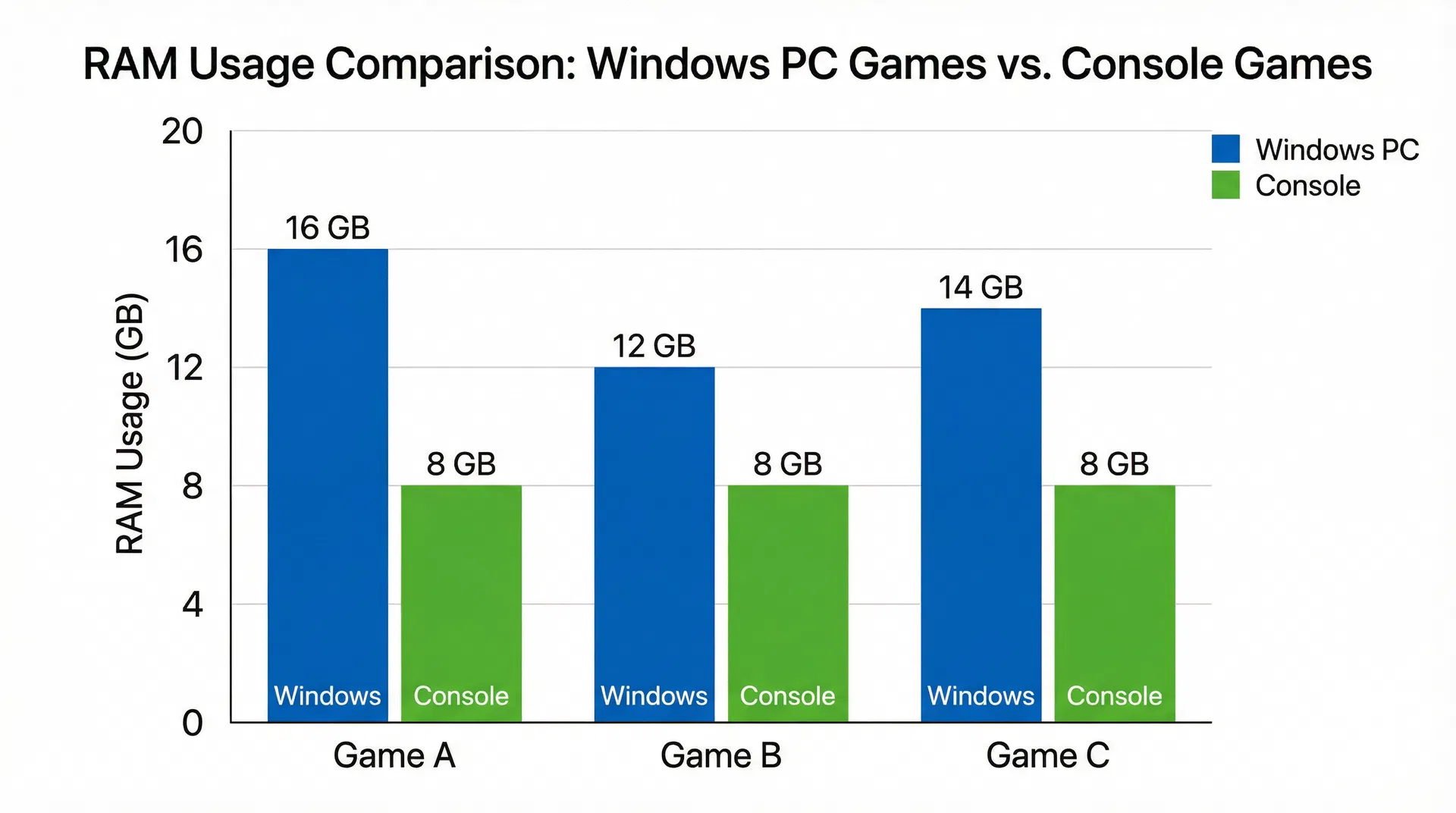
Understanding these differences has practical implications for PC gamers. To achieve optimal performance, ensure your Windows PC has adequate RAM for both the operating system and the game. Most modern games recommend 16 GB of RAM for smooth gameplay at high settings. Console games achieve similar visual quality with 8 GB of RAM due to the efficiency advantages discussed above. When comparing system requirements between PC and console versions of games, expect the PC version to require more RAM. Upgrading your system RAM can provide noticeable performance improvements in gaming, particularly when running background applications alongside games.
6.Future Trends and Optimization
Game developers are increasingly aware of RAM efficiency and are implementing better memory management techniques. Newer game engines like Unreal Engine 5 include advanced memory optimization features. DirectX 12 and Vulkan graphics APIs provide lower-level hardware access, reducing abstraction layer overhead. As these technologies become more prevalent, the RAM efficiency gap between Windows games and console games may narrow. However, Windows’s fundamental architecture as a general-purpose operating system means some overhead will always exist.
FAQ
Why do PC games require 16GB of RAM when consoles only have 8GB?
Consoles use highly optimized operating systems and unified memory architecture. Nearly all available RAM is dedicated to the game. On Windows PCs, the operating system and background applications consume significant memory, increasing total RAM requirements.
Does more RAM improve gaming performance?
Yes, if your system is currently memory-limited. Adding RAM reduces stuttering caused by paging to disk. However, once you exceed a game’s recommended RAM requirement, performance gains diminish.
Why does my PC use so much RAM even before launching a game?
Windows uses memory for system services, caching, drivers, and background applications like browsers or chat software. This is normal behavior in a multitasking operating system.
Do consoles actually use less memory, or is it just optimization?
Consoles use memory more efficiently due to fixed hardware, unified memory, and minimal operating system overhead. The difference is primarily architectural optimization rather than lower-quality assets.
Will future technologies reduce PC RAM usage?
New APIs like DirectX 12 and Vulkan reduce abstraction overhead. Modern engines such as Unreal Engine 5 improve memory management. While the efficiency gap may narrow, Windows will always require more baseline memory than specialized gaming consoles.
Conclusion
Windows games use more RAM than console versions due to operating system overhead, abstraction layer complexity, higher quality assets, and memory fragmentation. These differences reflect the fundamental architectural differences between general-purpose operating systems and specialized gaming platforms. Understanding these reasons helps gamers make informed decisions about system upgrades and expectations for gaming performance. As technology evolves and optimization techniques improve, the gap may narrow, but Windows’s flexibility and power will likely continue to require more system resources than specialized gaming consoles.